CygNet Service View ActiveX Controls
 Use the ActiveX tool to insert a variety of CygNet Service View ActiveX control objects into TheView. Service controls provide a window into a selected CygNet service. Each control is specific to a type of service, so when adding one to TheView be sure to select the correct control. In Run mode these controls have all of the same functionality as you would find in CygNet Explorer. You can add/edit/delete devices, points, view communications bytes, view history data, etc.
|
CygNet Service View ActiveX Controls |
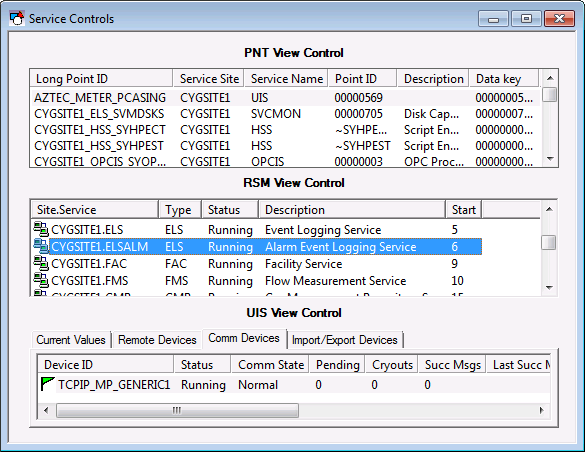
The CygNet service types that have ActiveX view controls are:
- CygNet ACS View Control — Access Control Service (ACS)
- CygNet ARS View Control — Address Resolution Service (ARS)
- CygNet AUD View Control — Audit Service (AUD)
- CygNet BSS View Control — Blob Storage Service (BSS)
- CygNet CAS View Control — Common Alarm Service (CAS)
- CygNet CVS View Control — any Current Value Service
- CygNet DDS View Control — Device Definition Service (DDS)
- CygNet ELS View Control — Event Logging Service (ELS)
- CygNet FAC View Control — Facility Service (FAC)
- CygNet GNS View Control — General Notification Service (GNS)
- CygNet GRP View Control — Group Service (GRP)
- CygNet MSS View Control — Master Scheduling Service (MSS)
- CygNet NOTE View Control — Note Service (NOTE)
- CygNet PNT View Control — Point Service (PNT)
- CygNet RSM View Control — Remote Service Manager (RSM)
- CygNet TRS View Control — Table Reference Service (TRS)
- CygNet UIS View Control — Universal Interface Service (UIS)
- CygNet VHS View Control — Value History Service (VHS)
To Add a CygNet Service View Control to TheView
- In the Standard Tools toolbar, click the ActiveX tool and then drag to place the object on TheView to access the Insert OLE Control dialog box.
- Select the name of the desired CygNet Service View control from the Insert OLE Control list and click OK.
- Configure the properties of the control. Most of the properties will be on the ActiveX page on the Property Sheet. See Configuring Object Properties for more information.


